Add the badge
Copy the code from the "Badge and widgets" page of your ProvedBuy account.
- In Shopify, open Online Store, Themes, then Customize.
- In the footer, add a "Custom Liquid" section.
- Paste the code and save.
- For product pages, open the "Default product" template and add a "Custom Liquid" block under the buy buttons.
Code HTML
<iframe src="https://provedbuy.com/encart/your-store.com?lang=en" title="Reviews verified by ProvedBuy" loading="lazy" style="border:0;width:100%;max-width:324px;height:168px"></iframe>
<p style="margin:6px 0 0;font:13px/1.4 system-ui,sans-serif"><a href="https://provedbuy.com/en/reviews/your-store.com" target="_blank" rel="noopener">Reviews verified by ProvedBuy</a></p>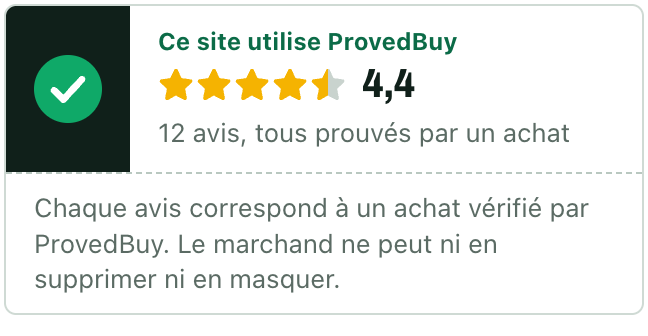
Send your orders without touching code
In Orders, click Export and choose CSV. Keep the Email, Billing Name and Name columns (Name is the order number), then import the file on the "Invitations" page of your ProvedBuy account. One import takes up to 500 rows.
Many stores run this import once a week. Orders already known are skipped.
Send every order automatically
On the Pro plan, create an "Order payment" webhook under Settings, Notifications. Shopify then calls your server, which passes the order to ProvedBuy with your key. The example below uses Node.js and Express. Add the Shopify signature check before putting it into production.
Shopify Flow also has a "Send HTTP request" action that accepts a custom header. It saves you from hosting a server if that is all you need.
Code Shopify
app.post("/webhooks/shopify/orders-paid", express.raw({ type: "application/json" }), async (req, res) => {
  res.sendStatus(200);
  const order = JSON.parse(req.body);
  await fetch("https://provedbuy.com/api/v1/integration/invitations", {
    method: "POST",
    headers: { "X-Api-Key": process.env.PROVEDBUY_API_KEY, "Content-Type": "application/json" },
    body: JSON.stringify({
      items: [{
        customerName: [order.customer?.first_name, order.customer?.last_name].filter(Boolean).join(" "),
        customerEmail: order.email,
        orderReference: order.name,
      }],
    }),
  });
});When the customer gets the invitation
Seven days after the order by default. The delay can be set from 0 to 30 days. If you ship from abroad, be generous.